Android 9.0 Features
1.
Indoor navigation with Wi-Fi RTT
Android
P now supports IEEE 802.11mc WiFi protocol which is also known as Wi-Fi
Round-Trip-Time (RTT). It’s one of the best features that Android fans are
waiting for.


This
new feature enables indoor GPS style tracking by determining your location
within a building and facilitating turn-by-turn directions to help you navigate
indoors.
2. Gesture
Navigation
Google
has redesigned the way you navigate the OS by introducing Gesture Navigation in
Android P similar to iPhone X.


3.
Dashboard
It’s
easy to lose track of time while you are glued to your phone watching YouTube
videos, playing games, or checking out social media.


4. App
Timer
Another
step towards Digital Wellbeing is the App Timer feature which lets you set time
limits on apps you use for a more extended period.


5. Do
Not Disturb
Meetings
and family gathering often demand your full presence, and Android P is going to
help you with that through its modified Do Not Disturb mode.


6. Wind
Down
Many
of us spend hours on our phones at night before we actually fall asleep. Wind
Down will help you curb this habit by switching on Night Light and turning on
the Do Not Disturb mode at your chosen bedtime.


7. Notch
support
Whether you like it or not,
every smartphone manufacturer is following the trend of notch displays. And
Google seemed a little unprepared since Android 8.0 had no support for a
display cut-out.


8. App
Actions
App
Actions is another great feature in Android P that helps you better navigate
through the day by giving smart suggestions based on your habits. It
can automatically anticipate your next action based on the current action.


9.
Slices
‘Slices’ is
one of the best Android P features which comes in handy at several places. It
lets you perform basic application activities outside the app.


Let’s
say you search for ‘Lyft’ in Google Search.
10.
Lockdown mode
The
latest addition to the power menu is the “Enter Lockdown” button. It’s one of
the top features of Android P that further boosts the security of your phone.

11. Zoom
in text
We can finally get rid of the
annoying mistakes of selecting incorrect text. Android P will now support Zoom
lens feature.


12.
Smarter Notification Channels
The
notification channels on Android P have been revamped and it allows you to
block the certain type of notifications from appearing on your phone.


13. Improvement in messaging apps
Messaging
apps have received several improvements to enhance the overall experience. A
notable feature is a provision for developers to make images viewable
in the notification shade for all incoming messages.


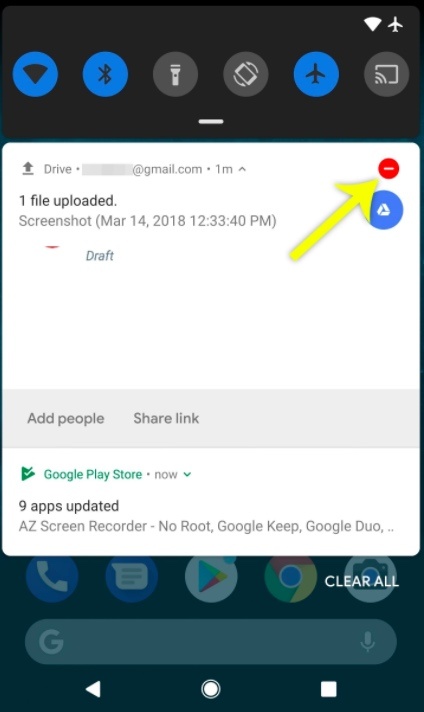
14. An
easier way to take screenshots and edit them
We
have already discussed the how to use Android P’s new screenshot editor where you
can edit and share your screenshots immediately after taking them.


15.
Auto-Rotate Button
The
addition of new contextually aware button makes auto-rotation a whole lot
easier and is one of the incredibly handy Android features I have seen.


16. Dark
theme
In the past, Google
automatically applied a dark or light theme based on the wallpaper’s color
tone. But Android P features a notable option to manually change from different
themes.


17.
Increased security
With
the increase of privacy concerns like Facebook tracking your activities,
it’s a relief to know that Android has revamped its privacy factor in the
newest version.
18.
Default HTTPS for apps
Internet
browsing works on two protocols: HTTP and HTTPS, with a major difference
being the encryption feature of the latter.
19. Pair
up to 5 Bluetooth devices
In Android 8.1 Oero, you had
the option of simultaneously connecting two devices via Bluetooth. But with
Android P, you can pair up to a maximum of five devices. It is important to
note that this new feature isn’t for simultaneous playback, however, it works
well with the new media panel


20.
Alert tone to notify call recordings
Call
recording feature is quite old, but what’s new is its ability to notify all
parties whenever a conversation is being recorded.
21. Media
Panel
Google Media notification
panel has always been chaotic. A lot of us had gone through that embarrassing
situation when a video plays on full volume even when we had turned it down.


22.
Support for HEIF image and HDR VP9 video format
The High
Efficiency Image File Format (HEIF) is a new image format developed by MPEG
group. Its advanced compression method retains higher image quality than JPEG
images and creates smaller file size.


23.
Autofill in browsers
Android
Oreo’s implementation of Autofill has one limitation, and that is its
inability to work with browsers.


24. 157
new emojis
With the Android P, Google
has introduced 157 new emojis including gender inclusive emoji as well as few
minor tweaks in emoji designs.


25.
Ambient Display for Battery Percentage
Ambient Display was
originally designed to show the current time and notifications on the
phone without having to go to the home screen.


26.
Adaptive Battery
Google
is relying more and more on AI to enrich user experience and its latest example
is ‘Adaptive Battery.’ As per the company, it has partnered with DeepMind to
get inputs on how to use machine learning for the best battery performance.


27.
Adaptive Brightness
Google
is aiming at making smartphones smarter by making it learn from your habits and
adapt according to your preferences.


28. ART
improvements
New
changes in the OS will improve the Android Runtime (ART) resulting in a
significant performance and efficiency boosts.


No comments:
Post a Comment